 Phosphor
Direct Touchscreen Mode
Tap directly on buttons, drag windows, draw, or select text on your iPad. Phosphor precisely recalculates touch coordinates to match your host screen geometry in real time.
Phosphor Pro Feature · Public Beta · macOS & Windows
Interact directly with your computer through your iPad display. Tap, click, drag, and navigate your Mac or Windows workspace with effortless touch precision and full trackpad gesture support.
Free desktop companion utility. Choose your platform below to start controlling your computer with touch gestures.
Phosphor Touch is currently in public beta. We're actively testing and refining multi-touch gestures, display coordinate mapping, and network discovery. Version 0.1.1 fixes a device detection issue from the initial release. Found an issue or have ideas? Share feedback on GitHub Issues or contact us via Phosphor Support.
Version 0.1.1 (Beta) · Universal (Apple Silicon & Intel)
Native menu bar utility for macOS 11 Big Sur, Monterey, Ventura, Sonoma, and Sequoia.
Version 0.1.1 (Beta) · 64-bit Windows
Lightweight system tray companion for Windows 10 and Windows 11.
Tap directly on buttons, drag windows, draw, or select text on your iPad. Phosphor precisely recalculates touch coordinates to match your host screen geometry in real time.
Transform the iPad surface into a giant low-friction trackpad with smooth 2-finger scrolling, right-click secondary taps, click-and-drag, and precision pointing.
Automatic mDNS Bonjour discovery connects your iPad to your computer across your local network in seconds. No IP addresses to type, no cloud servers, and no latency bottlenecks.
The Architecture
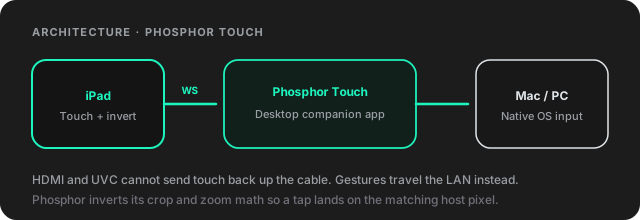
Standard HDMI and UVC video capture cards are strictly one-way video pipes. They cannot send touch signals back up the HDMI cable. Phosphor solves this elegantly:
Phosphor Touch signal pipeline
Up and running in less than two minutes.
macOS protects system input. The first time you connect, grant permission:
On Windows 10 and 11, running the app is quick:
Touch Controls is a premium Phosphor Pro feature. You can download the desktop companion app for free, and unlock Pro inside the iPad app with a single one-time purchase.
Never. All touch events stream directly over your local Wi-Fi network via an ultra-fast peer-to-peer WebSocket connection. No internet connection is required and no data ever leaves your local network.
Yes! You can use your finger or Apple Pencil / capacitive styluses to tap, click, drag windows, and interact with desktop applications.
Phosphor includes an intelligent viewport mapper. When you use pinch-to-zoom, pan, or auto-crop black bars, Phosphor automatically transforms touch coordinates so your tap lands on the correct host screen pixel.
Phosphor Touch is currently in active public beta (v0.1.1). Core touch gestures, window dragging, and trackpad navigation are fully functional. During the beta period, we are continuously enhancing multi-monitor configuration handling, custom display scales, and zero-latency Wi-Fi stability. If you run into any quirks or have suggestions, please let us know via GitHub Issues.